Region and zone editors
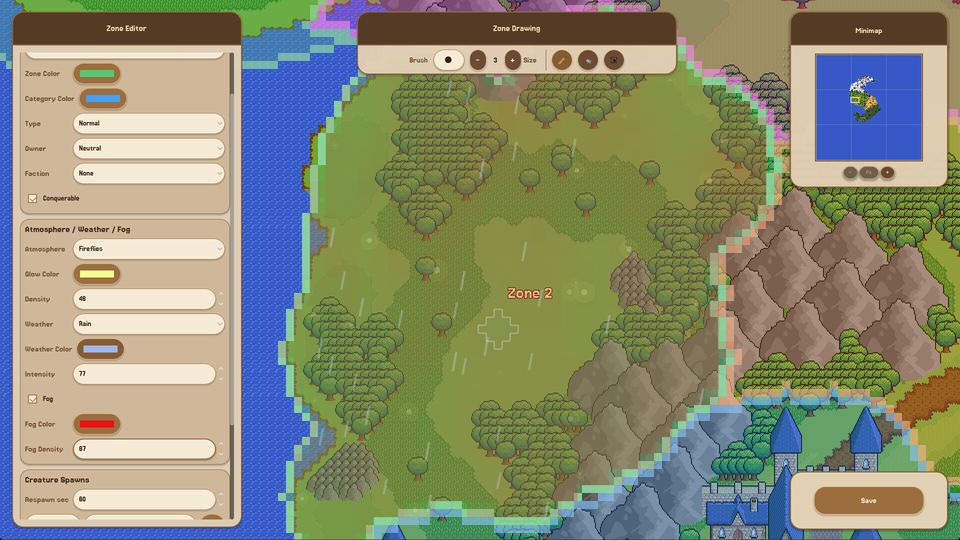
Regions are the big brushstroke; zones are the rules inside them. A zone carries an owner, a faction, a conquerable flag, atmosphere settings and creature spawn rules, and those rules are what the simulation reads.
Regions and zones are the layer between "I painted a map" and "something happens on it". They are two nested tools with different jobs, and most of the confusion around them comes from treating them as one.
A region is a named area you draw with a brush. It is a container. It gives you an inventory row, a name and a parent for zones, and it is what you group an area by when you want to talk about "the north" or "the valley".
A zone is a smaller area inside a region, and it is where the rules live: who owns the ground, which faction holds it, whether it can be conquered, what the atmosphere and weather look like, how thick the fog is and what creatures spawn there.
The workflow
- Draw the region with the region editor's pencil brush. Do not try to be precise at this stage; regions are containers and their borders matter far less than zone borders.
- Name it in the region inventory. The name is how you will identify it in lists and inspectors later.
- Draw the first zone inside it with the zone editor's brush, at a size you can see on screen.
- Open the zone panel and set ownership: type, owner, faction, and whether the zone is conquerable.
- Set the atmosphere block - colour, glow, weather, fog - if you want this place to look different from its neighbours.
- Set creature spawns and the respawn timer.
- Repeat for each zone, changing one thing at a time.
That last point is the useful discipline. If two zones differ in ownership and weather and spawn tables, and one of them behaves strangely, you have three suspects. Change one variable per zone while you are learning.
Ownership is the switch that makes politics
Three fields decide whether a zone participates in the simulation:
- Type - what kind of zone this is, from the game's zone taxonomy.
- Owner / Faction - who holds it. Without an owner, a zone is neutral ground.
- Conquerable - whether the zone can change hands at all.
A zone that is owned and conquerable is a border. A zone that is owned and not conquerable is a capital. A zone with no owner is scenery, and no amount of terrain detail will make it behave otherwise.
If you want a war, the recipe is: two factions, adjacent conquerable zones, and a reason for one to want the other's ground. The third part comes from needs and threat; the first two are entirely your doing.
Atmosphere, weather and fog
The zone panel carries a full atmosphere block: a zone colour and a category colour for the editor's own display, then glow colour and density, weather type with colour and intensity, and fog with colour and density.
Two practical notes. First, the editor colours are labels - they help you read the map in the editor and have no effect on the simulation. Second, the atmosphere values are per zone, which means a valley can be foggy while the hill above it is clear. That is a cheap way to make a small map feel larger than it is.
Weather and fog also change what the player can see while watching the simulation, which matters more than it sounds: in a fog-heavy zone you will genuinely miss events unless you zoom in.
Spawn rules decide where danger lives
Creature spawns and the respawn timer sit in the same panel. This is the field that turns a zone from scenery into a threat: a zone that spawns creatures will keep spawning them, on the timer you set, and the local factions will eventually have to deal with that.
A good pattern for a first dangerous zone: put it between two factions rather than inside one. Now the danger is a shared problem, and the simulation has a reason to produce alliances, escorts or wars. The faction guide covers what happens next; the zone field reference lists every field with what it changes.
Inspecting what you built
The launch build ships inspectors for regions, zones, factions and creatures. The zone inspector is the one to keep open while you work: it reports the zone's current state rather than the values you typed, which is how you catch a zone whose ownership silently failed to apply because the faction was deleted or renamed.
Common mistakes
Drawing zones before regions. Zones want a parent; orphan zones show up in the inventory but are hard to reason about later.
One giant zone. A single zone covering the whole map means one owner, one spawn table and one weather state. Nothing can change hands because there is only one thing.
Setting atmosphere before ownership. Weather is the fun part, ownership is the functional part. Do the functional part first so you can test the world, then decorate it.
Forgetting the conquerable flag. A perfectly built border that cannot change hands will never produce a war, and you will spend an hour wondering why the factions are ignoring each other.